MAC Clone Service for Articona
Version 2.1 by Alex Chang on 2022/12/22 11:14
Installation
Please install this program through the installation program. This program requires administrator privileges to check LAN card and USB information.
- install location : C:\Program Files (x86)\Articona\Articona Mac Clone Service
- Windows Service Program: It is a background program to check usb dock (ethernet) devices and set the mac clone information.
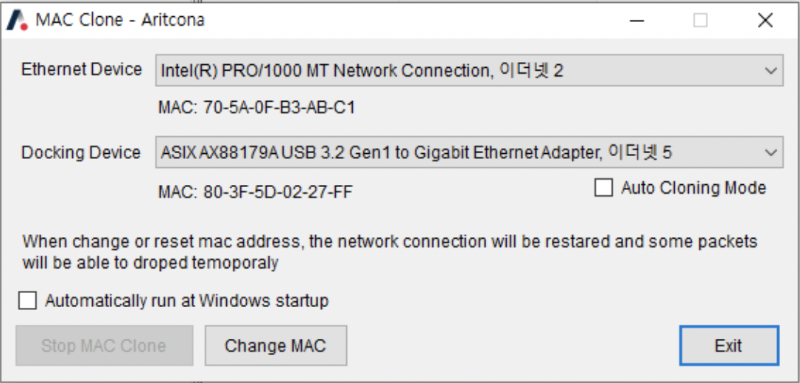
- Manager Program : it is a GUI program to check the current status and change the mode.
Mac Clone(Passthrough) Mode
- AUTO Mode :The program automatically recognizes the Ethernet card of the main PCI interface and the Ethernet interface on the DOCK, and clone the Mac address of the PCI card to the USB device.
- Manual Mode : Users can specify the source PCI ethernet card and the ethernet card on the dock to clone the Mac address.
Manager Program
Notes
- It takes a certain amount of time to recognize the device and change the information.
- Reconnecting devices too quickly can cause programs to malfunction.
- it also need to restart network devices. The network connection may be temporarily lost.